

In 2025, trend of remote work continues to spread all over world. Software-as-a-Service (SaaS) tools play an important role in enabling teams to collaborate effectively. Physical location does not matter in this regard.
Table of Contents
This article explores the best SaaS tools for remote teams, offering up-to-date review of platforms that intensify collaboration and productivity. This article discusses its features, pricing models, and how the SaaS tools can be used for remote teams.
Communication and Collaboration SaaS Tools for Remote Teams
For any successful business, there is an efficient communication and collaboration between working teams. As remote and hybrid work models continue to dominate the modern workplace, efficient communication and collaboration tools are more important than ever.
SaaS tools, in this regard, bridge the gaps between geographically dispersed teams. These tools enable real-time interaction, project alignment, and seamless workflow management.
Here is an analysis of some of the best SaaS tool for communication and collaboration that remote teams are using in 2025.
Slack
Slack is best-known for real-time communication and app integrations. Slack has become almost synonymous with team messaging. It is designed to replace scattered emails and fragmented conversations. One of the benefits is that it offers structured, fast, and searchable communication through channels, direct messages, and app integrations.
Slack serves as a virtual office. Remote teams create channels for different departments, projects, or client work. For example, a marketing team might use Seo-Strategy and Content-Planning to stay organized.
Slack Huddles allow quick impromptu discussions, replacing the need for spontaneous in-office meetings. The integrations centralize tasks and file sharing, so remote teams don’t have to juggle multiple platforms.
Key Features and Category
- Instant messaging and collaboration.
- Organized conversations in channels
- Direct messaging
- Huddles (Lightweight audio and video calls)
- 2,000 plus integrations (Google Drive, Asana, etc.)
- Workflow automation builder.
Pricing
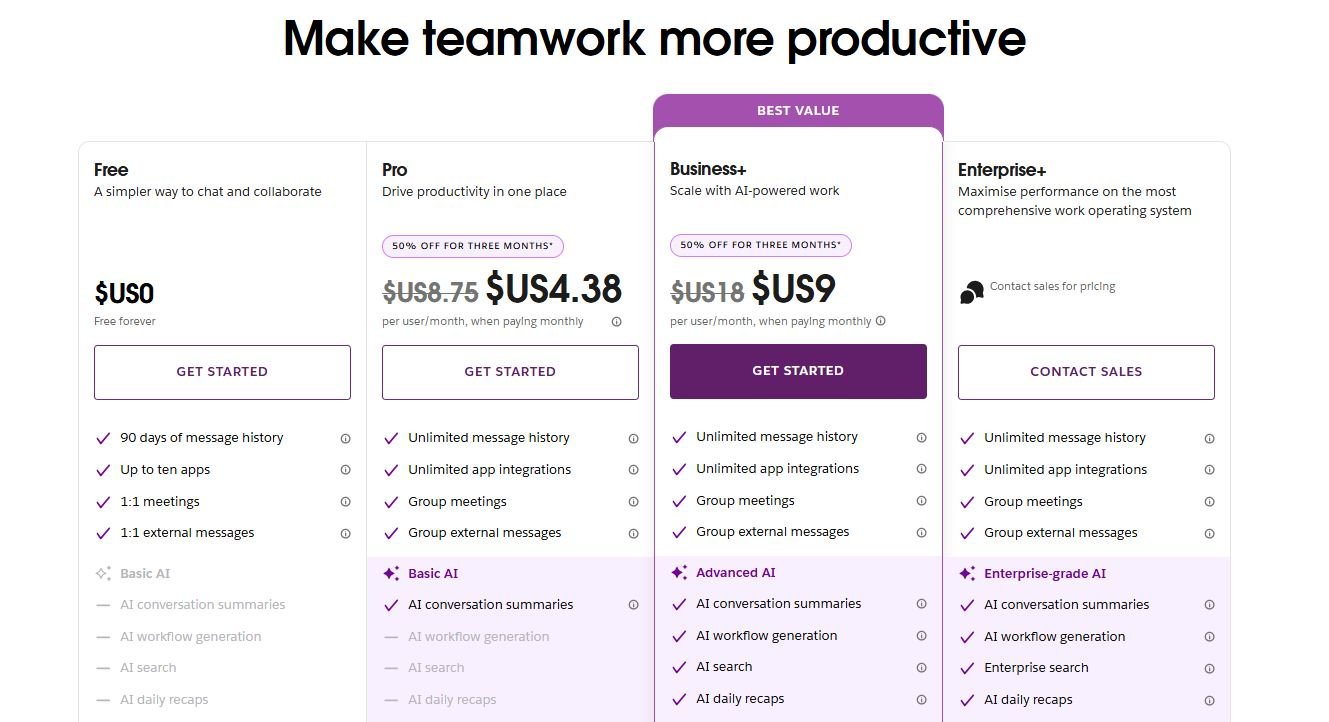
- Free: Basic chat. 90-day message history
- Pro: $4.38/user/month
- Business+: $9/user/month
- Enterprise Grid: Custom Pricing
Microsoft Teams
Microsoft team is ideal for large enterprises that are already embedded in Microsoft’s ecosystem. Teams can co-author documents in real time, schedule meetings through Outlook, and chat in treads or direct messages.
Remote teams use Microsoft teams for daily check-ins, client calls, and document management all within one platform. The built-in security features also make it suitable for industries with strict compliance needs.
Key Features and Categories
- Category: Unified Communication & Microsoft 365 Integration
- Chat and video conferencing
- Native file sharing and editing via OneDrive
- Channel-based communication
- Direct integration with Word, Excel, PowerPoint
- Calendar and meeting scheduler
Pricing
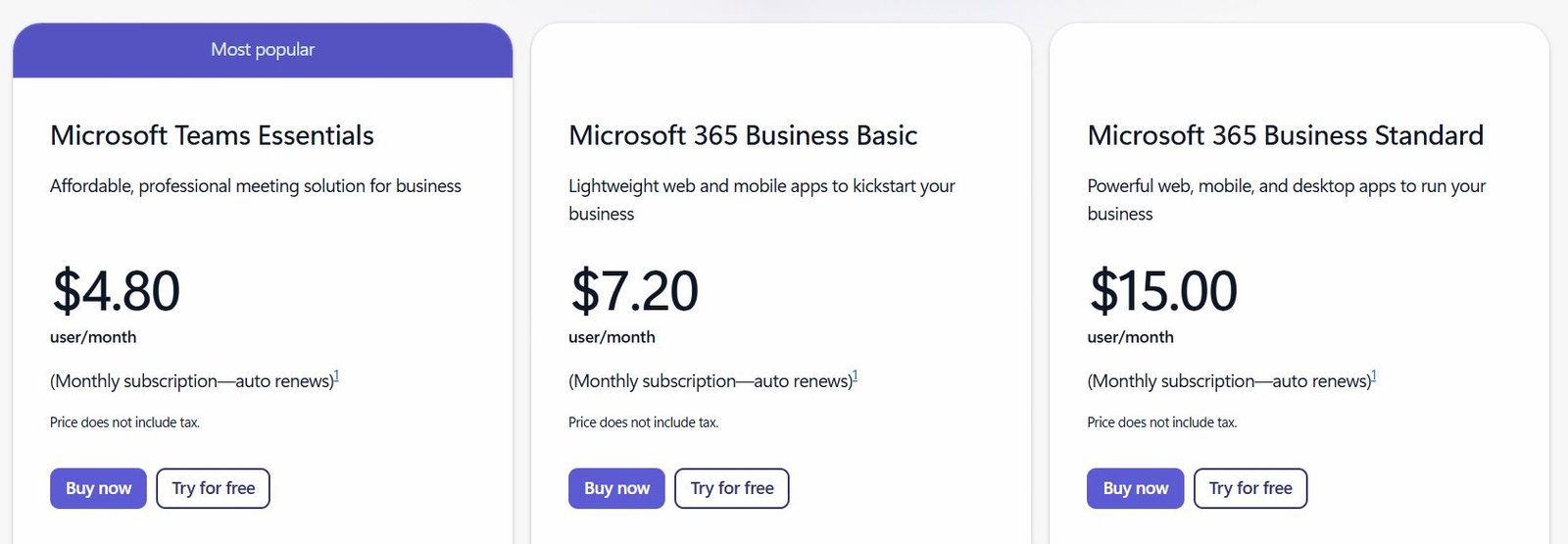
- Microsoft Teams Essentials: $4.00/user/month
- Microsoft 365 Business Basic: $7.20/user/month
- Business Standard: $15/user/month
- Office 365 E3: $20/user/month
Zoom
It is a platform for high-quality video meetings, webinars, and online workshops. This tool is also used among individuals who are freelancers or small business owners.
Remote teams host daily standups, client presentations and virtual team-building sessions using Zoom. Breakout rooms are especially useful for collaborative group exercises or brainstorms.
For distributed teams, the meeting recording feature ensures that those in different time zones can catch up asynchronously.
Key Features
- HD video and audio meetings
- Meeting recording and transcription
- Breakout rooms
- Virtual backgrounds and filters
- Whiteboard and annotation tools
Pricing
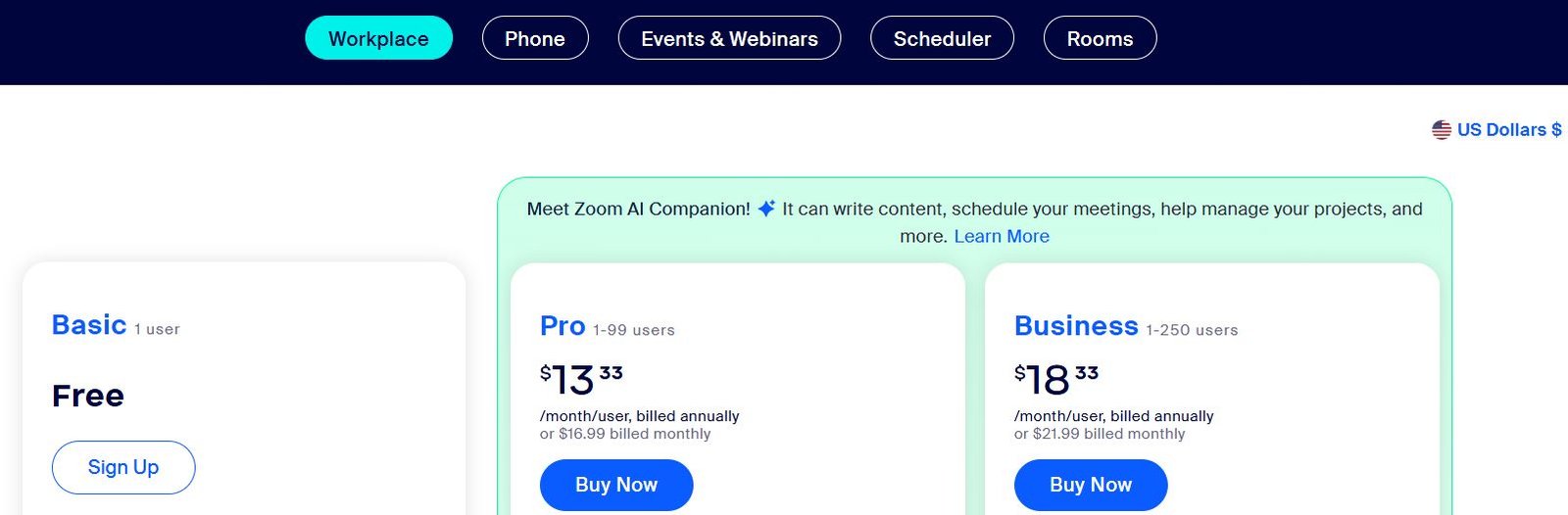
- Basic: 1 user Free up to 40 minutes per meeting
- Pro: 1-99 users $13.33/month/user, billed annuallyor $15.99 billed monthly
- Business: 1-250 users $18.32 /month/user, billed annually or $21.99 billed monthly
Google Meet (via Google Workspace)
It is a natural choice for remote teams using Gmail, Docs, and Calendar. It is fully integrated with Google Workspace. As a remote team user, you can instantly launch a video call from any Google app, share screen for live presentations, or use companion mode for hybrid teams.
Key Features
- Category: Video Meetings
- One-click meeting access via Gmail/Calendar
- Real-time captions and noise cancellation
- Meeting recording (Standard tier and up)
- Secure by default with encryption
Pricing (via Workspace)
- Business Starter: $6/user/month
- Business Standard: $12/user/month
- Business Plus: $18/user/month
- Enterprise: Custom pricing
Twist
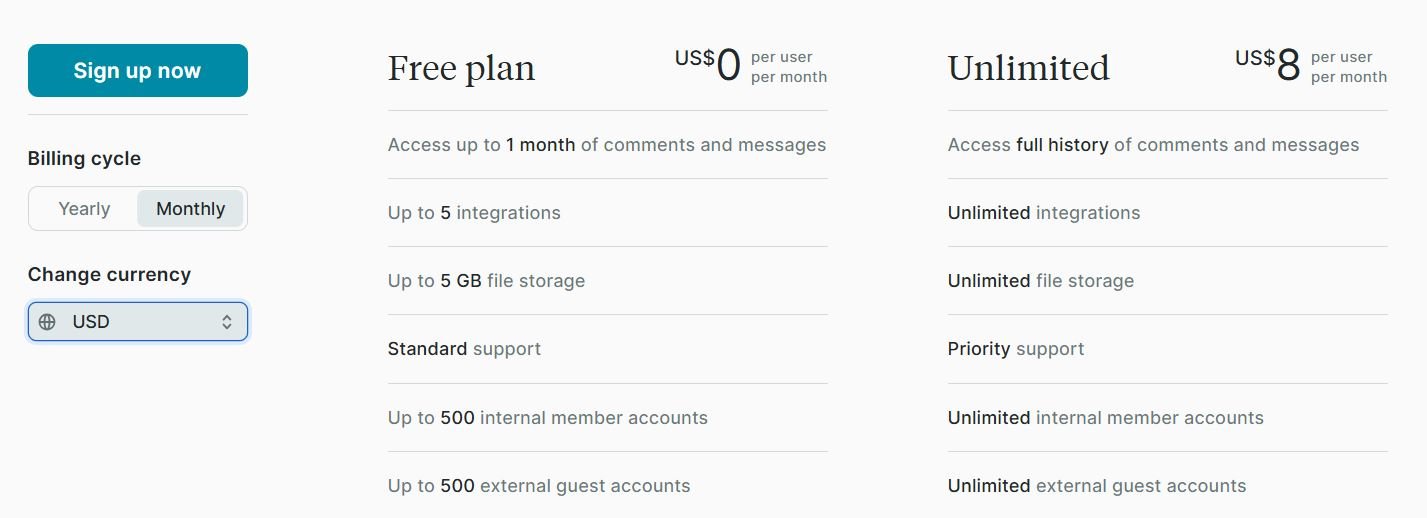
Twist is useful for remote teams working across time zones. Such remote teams prefer Twist for its asynchronous-first design. Instead of chasing real-time replies, Twist allows long-form, thoughtful conversations. Remote teams use it to replace the chaos of Slack for deep project discussion or decisions.
Pricing
- Free: Limited features
- Unlimited Plan: $6/user/month
Key Features
- Threaded discussions (not real-time chat)
- Inbox-style interface for focus
- Deep integration with Todoist
- Clean, distraction-free design
- No online presence indicators (no “typing…” or “seen” statuses)
Miro
Miro is perfect for brainstorming sessions, sprint planning, workshops, and design thinking. For example, a UX team can collaboratively map out a customer journey or feature flow. Teams use sticky notes, draw mind maps, or conduct remote retrospectives. Miro’s board sharing and commenting capabilities make it easy for async feedback and team contributions, even after meetings end.
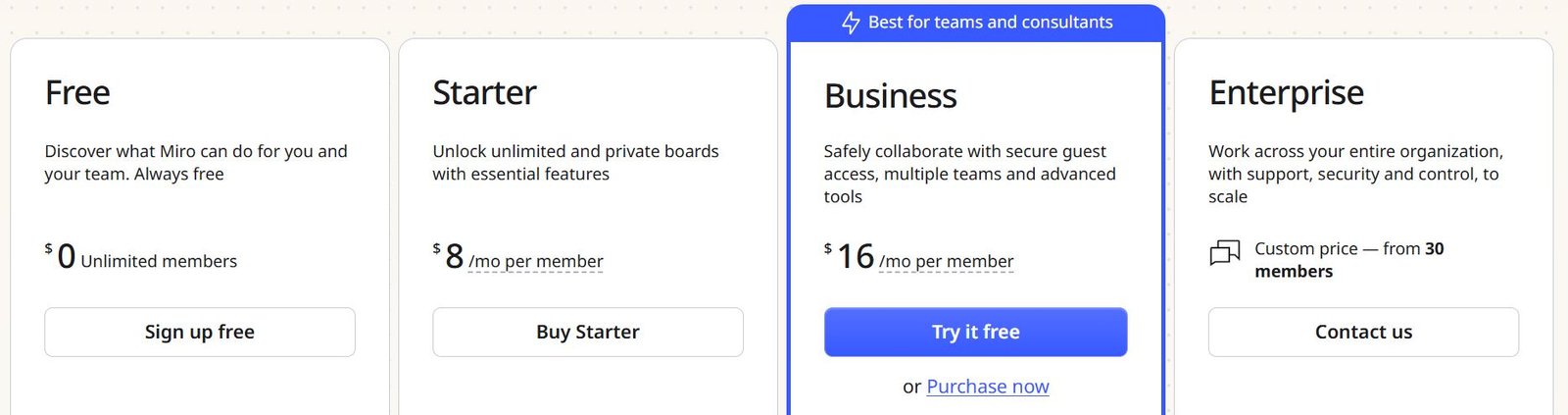
Pricing
- Free: 3 editable boards
- Starter: $8/user/month
- Business: $16/user/month
- Enterprise: Custom
Key Features
- Infinite whiteboard canvas
- Templates for brainstorming, workflows, product roadmaps
- Sticky notes, drawing tools, voting, timers
- Integrates with Slack, Zoom, Google Drive
- Supports real-time and async collaboration
Project and Task Management SaaS Tools for Remote Teams
For remote teams, managing project is a difficult task. Remote workers are encouraged to use cloud-based project and task management tools. These platforms allow distributed teams to track tasks, monitor progress, set deadlines, and collaborate in real-time. All the activities ensure that everyone stays aligned regardless of location.
Asana
Asana is used to break down large projects into actionable tasks, assign responsibilities, and visualize timelines. Remote teams also use them for their benefits and easiness.
For example, a marketing team can plan a campaign with tasks like content creation, design, and launch tracking. Using Asana helps teams see how tasks relate and how to save time on repetitive actions.
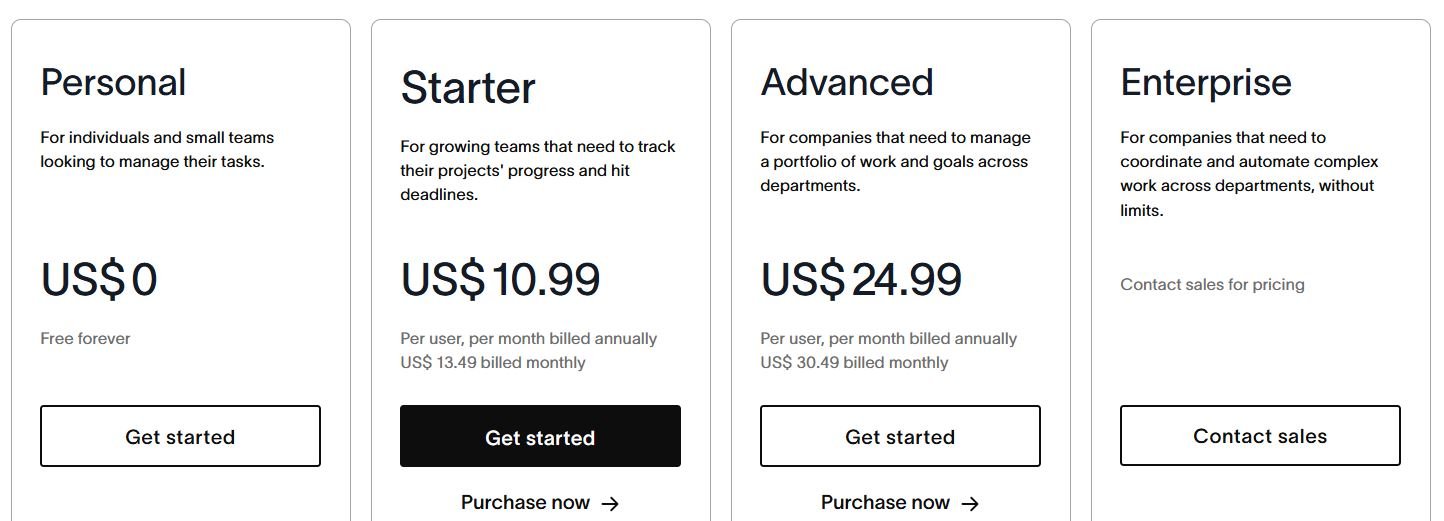
Pricing
- Free: For individuals/small teams (up to 15 members)
- Starter: $10.99/user/month
- Advanced: $24.99/user/month
- Enterprise: Custom pricing
Key Features
- Task lists, Kanban boards, calendars, and Gantt (Timeline) views
- Project templates for common workflows
- Goal tracking and workload management
- Automation rules (e.g., move task when marked complete)
- App integrations (Slack, Zoom, Google Drive, etc.)
Trello
Project Management tools are known for its complex interface. Trello is famous for its simplicity and visual appeal. Remote teams use Trello for daily task boards, sprint planning or editorial calendars. Tasks are presented on cards, and you can easily assign members, set due dates, or comment on progress.
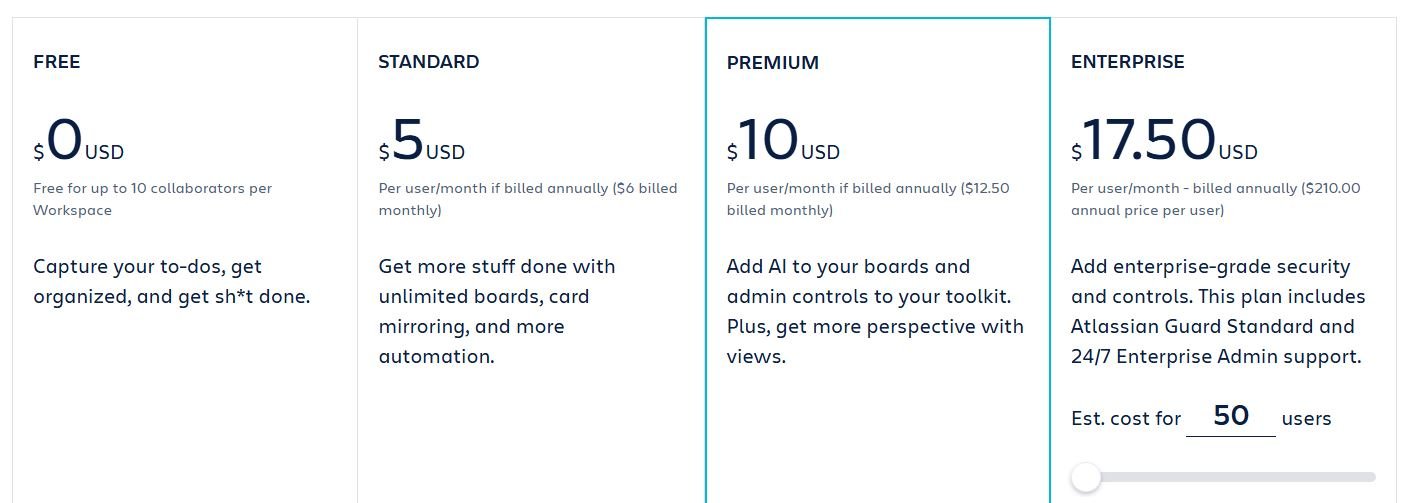
Pricing
- Free: Unlimited cards, up to 10 boards
- Standard: $5/user/month
- Premium: $10/user/month
- Enterprise: $17.50/user/month
Key Features
- Drag-and-drop Kanban boards
- Custom fields and labels
- Butler automation for recurring tasks
- Power-Ups (integrations) like Calendar, Google Drive, Slack
- Collaboration with checklists, comments, due dates
ClickUp
This project management tool is suitable for remote teams who want to centralize everything in one tool. For example, a product team can manage dev sprints, create feature specs, track bugs, and run daily standups all within ClickUp. Its interface is highly customizable.
Its highly customizable interface lets teams choose the structure that suits their workflow.
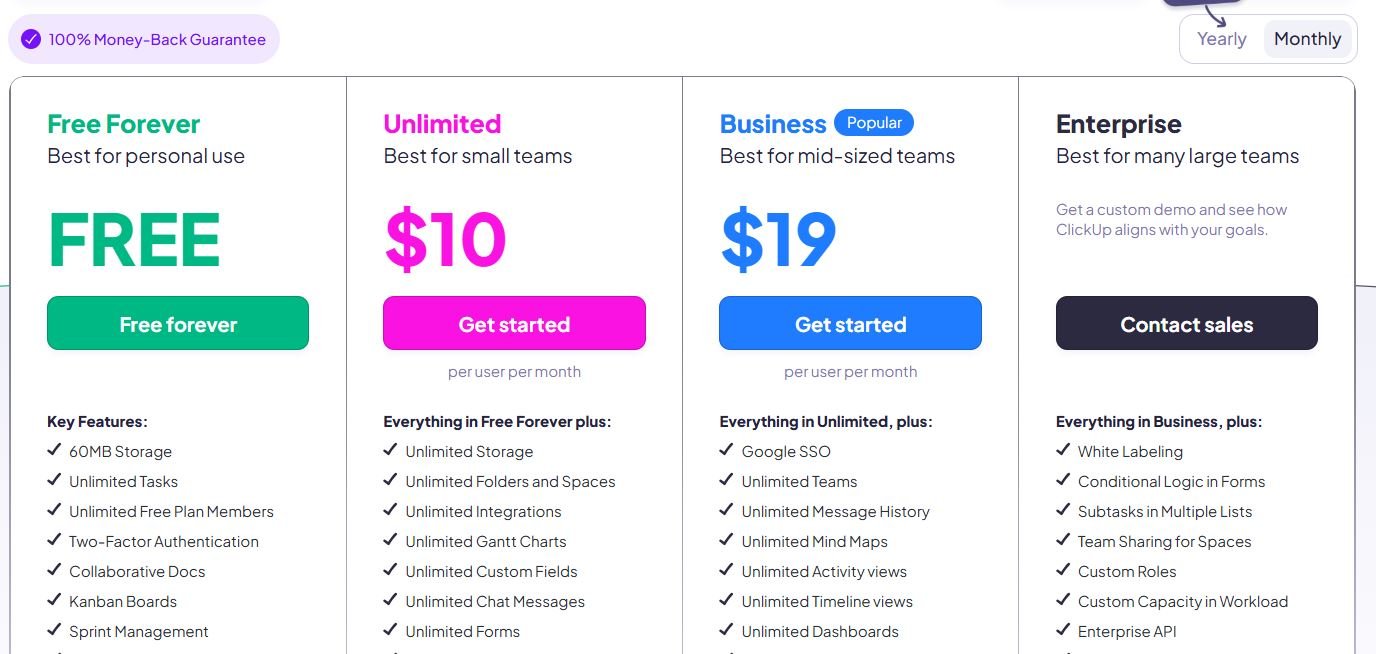
Pricing
- Free: Up to 100MB storage
- Unlimited: $7/user/month
- Business: $12/user/month
- Enterprise: Custom
Key Features
- Category: All-in-One Project Management
- Tasks, docs, goals, and time tracking in one platform
- Multiple views (List, Board, Calendar, Gantt, Box, Mind Map)
- Real-time chat within projects
- Built-in docs and wikis
- Native time tracking and workload view
Moday.com
This tool is useful for cross-functional project visibility. Remote teams can track everything from sales pipelines to product development. A remote HR team might use it to manage hiring pipelines, while a design team tracks deliverables and client feedback.
Pricing
- Free: Up to 2 seats
- Basic: $9/user/month
- Standard: $12/user/month
- Pro: $19/user/month
- Enterprise: Custom
Key Features
- Color-coded boards and timelines
- Automations (e.g., notify when status changes)
- Pre-built templates for CRM, marketing, HR
- Time tracking, dependencies, workload planning
- 200+ integrations including Slack, Jira, and Zoom
Wrike
It is useful for mid-to-large teams that need advanced structure. Remote team uses it to manage complex workflows. Remote teams from large enterprise environment and IT are encouraged to use Wrike.
For example, an agency managing multiple client campaign can track brief, approvals, deadlines, and revisions from a centralized platform. Its in-depth reporting tools also help leadership keep tabs on performance.
Pricing
- Free: Basic task management
- Team: $9.80/user/month
- Business: $24.80/user/month
- Enterprise: Custom
Key Features
- Dynamic request forms and project templates
- Time tracking and workload analytics
- Gantt charts with critical path
- Dashboards and real-time activity streams
- Advanced reporting and custom workflows
Final Thoughts
Remote work can be a hectic task if not managed properly. Remote work thrives on clarity, using the tools help bring structure, accountability, management, and insights into daily workflows. Whether your need something lightweight or full-featured SaaS tool, adopting a time tracking solution can significantly boost team’s efficiency and overall performance.
FAQs
What are the best SaaS tools for remote teams?
Well, it depends on the type of work. The best SaaS tool for remote teams in 2025 include Slack for communication, Asana for project management, Notion for documentation, Toggl Track for time tracking, and Google Workspace for collaboration. These platforms improve work performance in remote setting.
How do SaaS solution improves productivity in remote setting?
In remote setting, SaaS solutions improve productivity by centralizing communication, organizing projects, and enables real-time collaboration.
Are SaaS tools secure for remote teams?
Yes, most modern SaaS tools use enterprise-grade encryption, multi-factor authentication, and compliance with GDPR or SOC 2 standards to ensure data security. Along with that remote teams should use internal security system like using strong passwords and enabling two-step verification.
What is the difference between on-premise and SaaS tools for teams?
On-premise tools and SaaS tools are different in nature. On-premise tools are installed and managed locally on company servers. SaaS tools, on the other hand, are cloud-based. These tools are accessible from anywhere with an internet connection.

